




|
Name |
ibis Paint X |
|---|---|
|
Google Play Link |
GET IT ON
Google Play
|
|
Category |
Art & Design |
|
Developer |
ibis inc. |
| Last version | 14.1.0 |
|
Updated |
|
|
Compatible with |
Android 4.4+ |
Introduction to ibis Paint X APK
ibis Paint X is a mobile drawing application designed for smartphones and tablets, mainly on Android and iOS. It works as a digital art tool that lets users sketch, paint, and edit images directly on their screens. The app focuses on giving artists a portable workspace without needing a computer or expensive software.
The main purpose of this app is to help users create digital illustrations with ease. It offers a wide selection of brushes, drawing tools, and editing options that fit different art styles. From simple doodles to detailed illustrations, users can handle everything in one place. The interface feels modern and flexible, though it may take a little time to get used to at first.
One of the standout features is the large brush library. There are hundreds of brush types, each with adjustable settings like size, opacity, and pressure. This allows artists to create clean line art or textured paintings depending on their needs. The app also supports stroke stabilization, which helps produce smoother lines, especially useful for beginners or those drawing on smaller screens.
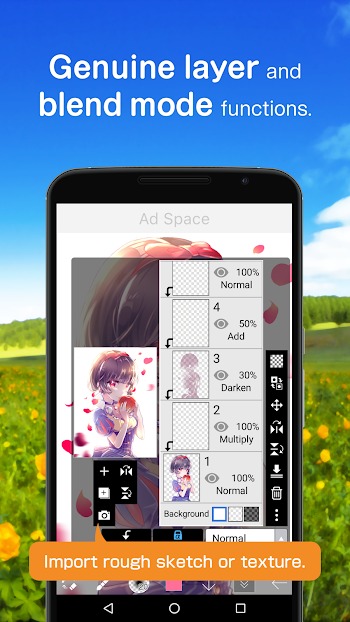
Layer support is another key part of the app. Users can separate elements of their artwork into different layers, making it easier to edit without affecting the whole piece. You can adjust layer opacity, apply blending modes, or rearrange layers to build depth. This feature is often found in desktop software, so having it on mobile is a big advantage.
The app also includes tools for recording the drawing process. It can turn your work into a time-lapse video, which is great for sharing or reviewing your progress. There are also basic photo editing tools like cropping, color adjustment, and filters, making it useful beyond just drawing.
On the downside, the app can feel heavy on lower-end devices, especially when working with large canvases or many layers. Some advanced features are locked behind a paid plan, and ads may appear in the free version. The interface may also feel crowded for first-time users.
This app fits a wide range of users. Beginners can practice drawing with guided tools, while experienced artists can work on more complex projects. It is especially useful for people who want to create art on the go, during travel, or in short free moments throughout the day.
FAQs ibis Paint X
What is ibis Paint X used for?
+
It is used for digital drawing, painting, and basic photo editing on mobile devices, helping users create illustrations and artwork easily.
Is ibis Paint X free to use?
+
Yes, it has a free version with core features, but some advanced tools and options require a paid subscription.
Can beginners use ibis Paint X easily?
+
Yes, beginners can start with simple tools, though it may take a bit of time to learn all the features.
Does ibis Paint X support layers?
+
Yes, it supports multiple layers with blending modes, opacity control, and flexible editing options.
Is ibis Paint X good for professional artists?
+
Yes, many advanced tools like custom brushes and layer control make it suitable for more experienced artists as well.
Discover More Interesting Apps
-
 Mod
Mod
Crafto
v11.6.4
206.00 Mb
Updated -
Mod
Clip Studio Paint
v5.1.4
468.01 Mb
Updated -
Mod
AI Image Generator
v3.0.3
45.77 Mb
Updated -
Crafty Art
v1.42
70.16 Mb
Updated -
Mod
FlipaClip
v4.2.40
321.29 Mb
Updated -
Niji Journey
v1.44.0
111.89 Mb
Updated -
Mod
Festival Studio
v1.76
105.94 Mb
Updated -
Mod
AR Drawing
v5.2.5
85.29 Mb
Updated -
Mod
GoArt
v3.5.12.3
326.00 Mb
Updated -
Freepik AI
v6.3.0
63.00 Mb
Updated









Share Your Thoughts